-2.png?width=359&height=449&name=text-image%20module%20desktop%20(4)-2.png)
.jpg?width=276&height=195&name=1-Jul-02-2024-10-07-08-8540-AM%20(1).jpg)
.jpg?width=276&height=196&name=Case%20study%20(21).jpg)
.jpg?width=277&height=196&name=10-2%20(1).jpg)

-2%20(1).png?width=298&height=420&name=text%20image%20tablet%20(31)-2%20(1).png)





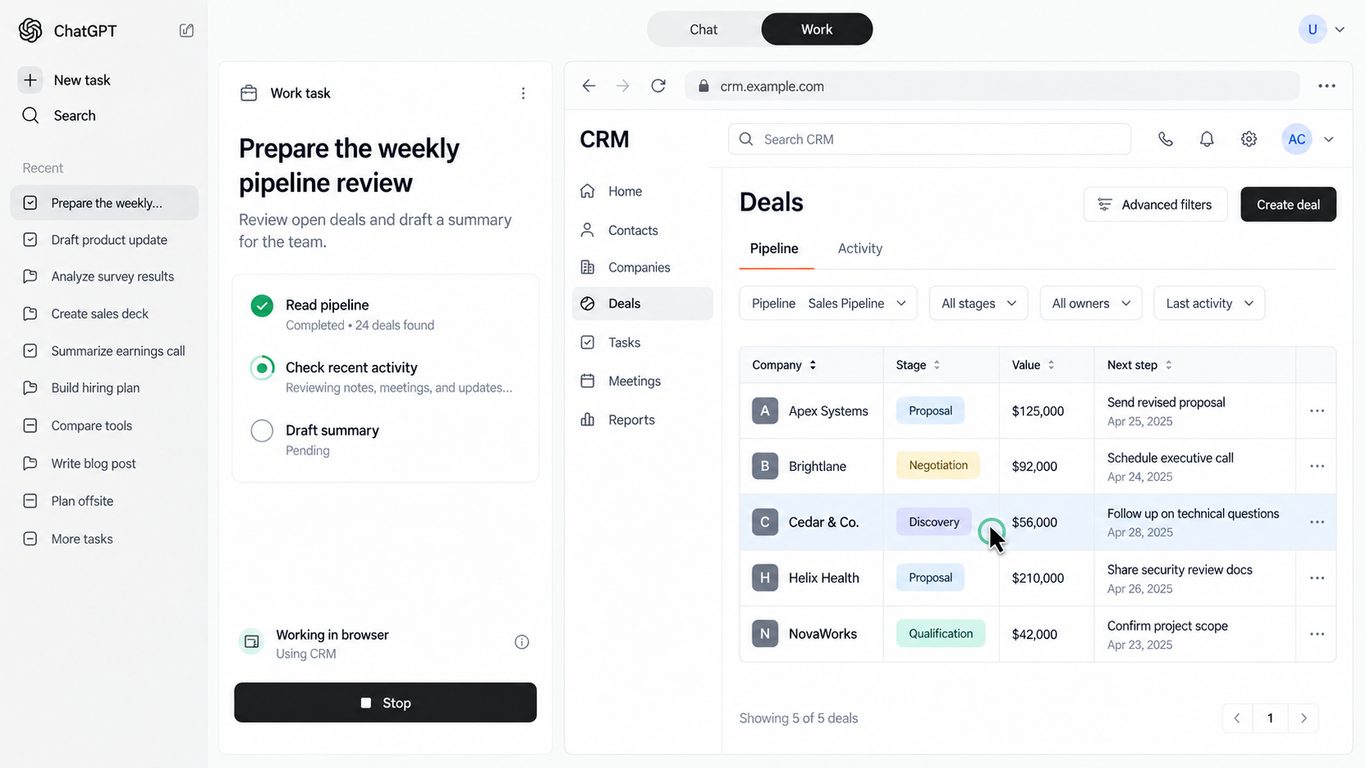
Most workplace AI still lives in a chat box. You ask a question. You get an answer. Then you do the swivel-chair work: open the CRM, update the spreadsheet, chase the calendar invite, paste the draft into email.
That pattern is starting to break.
OpenAI’s GPT-6 Astra is built for harder end-to-end work, and ChatGPT Work is the product surface where that model can gather context across files and apps and aim for finished deliverables. The piece that will matter most to UK mid-market teams is computer use: the ability to work through everyday desktop apps and websites, including tools that never offered a tidy API.
This article explains, in plain terms, what Astra is, what computer use looks like day to day, how ChatGPT Work fits, and how employee roles shift when AI can click as well as write. It also covers what should not change, and how to pilot this safely before you scale.
Three names, three jobs (keep them separate)
It helps to lock the vocabulary early:
- GPT-6 Astra is the model. The engine.
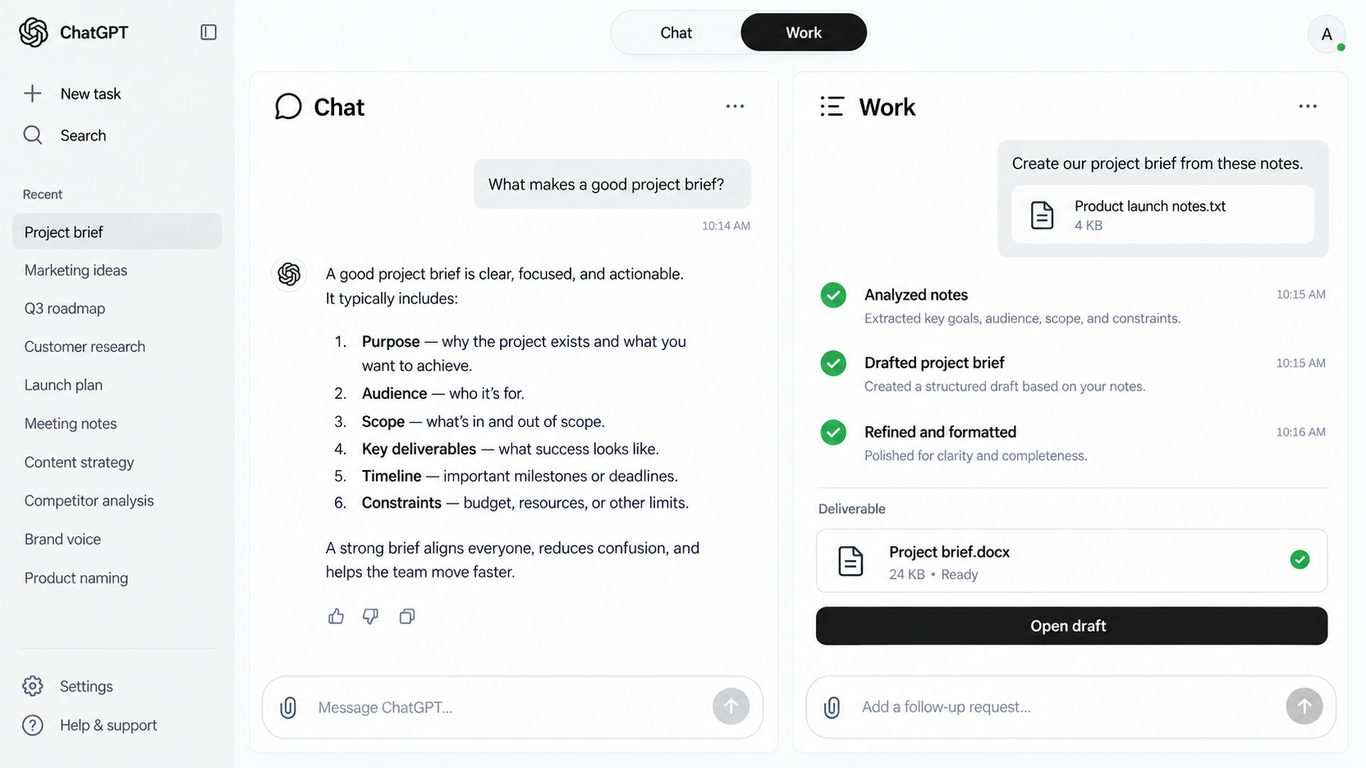
- ChatGPT Work is the product mode where that engine is steered toward real work outputs (docs, sheets, decks, multi-step tasks).
- Computer use is the desktop capability: acting inside approved apps and sites with your permission, not only generating text in a chat.
You do not need a developer background to use any of this. You do need clearer goals, tighter permissions, and a habit of reviewing before anything irreversible goes out the door.
What GPT-6 Astra actually is
OpenAI announced GPT-6 Astra around 3 September 2026 as a flagship model for professional work. ChatGPT Work itself launched earlier, in July 2026. Astra is available in ChatGPT Work and Codex (and via API for builders). It is strong on computer use, browsing, professional deliverables, and coding.
Video: OpenAI — “Introducing GPT-6 Astra for developers”. Demos are illustrative.
OpenAI’s own computer-use numbers are worth knowing, even if you never quote benchmarks in a management meeting:
- On Mind2Web with a Codex harness, OpenAI reports roughly 1.9× faster task completion versus GPT-5.6 Sol.
- On OSWorld 2.0, OpenAI reports Astra at 72.6% success in about 40 minutes per task, versus Sol at 65.7% in about 75 minutes.
- On internal computer-use safety checks, OpenAI reports unintended outcomes about 89% less often than with Sol.
You do not need the scorecard to feel the difference on a Tuesday afternoon. The practical story is simpler: fewer half-finished runs, better following of templates and voice, and more tasks that end as something you can review rather than rebuild.
One plan note, lightly: Plus includes Astra in Work and Codex. GPT-6 Pro in Chat is a separate, plan-gated choice. Astra also tends to burn Work/Codex allowance faster than lighter models, so treat heavy computer-use runs as a scarce resource, not background wallpaper.
Computer use: from answers to actions
Chat has always been good at explaining. Computer use is good at doing.
Think of the difference like this. Chat can tell you how to update a customer record. Computer use can open the approved CRM, make the change you asked for, and show you the result for review. Same intent. Different amount of swivel-chair work left for the human.
In practice, that can look like:
- Filling a form in a browser tool that has no API
- Updating CRM fields after a call, then drafting the follow-up email
- Researching options, then dropping a summary into a Word doc or email draft
- Tidying a calendar, checking travel options, and preparing a brief for the traveller
- Walking through what is on screen to troubleshoot a broken process
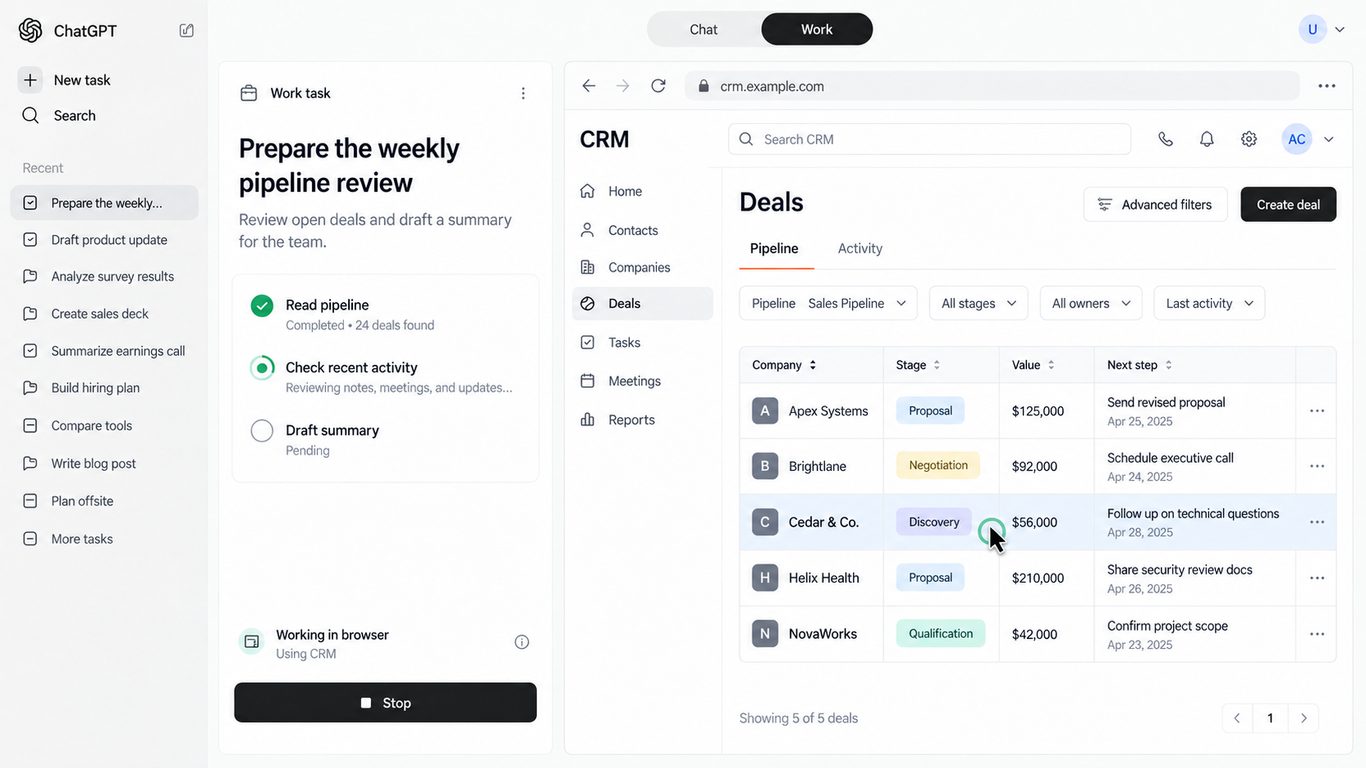
The important business point is not magic. It is compatibility with messy reality. Lots of mid-market software is sticky, licensed, and awkward to integrate. Computer use works through the interface humans already use, within the apps and sites you allow.
For employees, the translation is personal: less time as the human API between five tabs. More time setting the brief, checking exceptions, and owning the outcome.
That does not mean unsupervised autonomy. Good computer use still starts with a clear ask, stays inside the apps you allow, and pauses when something consequential needs a person. The win is fewer boring hand-offs, not fewer adults in the room.
Availability note: Computer Use is a desktop capability with allowed apps only. OpenAI expanded access in regions including the UK, EEA, and Switzerland around June 2026. Treat availability as something to verify for your tenant and plan, not as a hard guarantee for every seat on day one.
Video: OpenAI — “ChatGPT can now complete tasks on your computer”. Demos are illustrative.
ChatGPT Work: where this becomes day-to-day
ChatGPT Work is where computer use stops being a demo and starts looking like Tuesday.
Video: OpenAI — “Get started with ChatGPT Work”. Demos are illustrative.
In broad strokes:
- Chat is still the place for questions, ideation, and quick drafting.
- Work gathers context across files and connected apps and aims for finished artefacts: documents, spreadsheets, decks, and similar outputs.
- Codex is the builder/coding lane. Useful for technical teams; not the focus of this piece.
On desktop, Work can use local files and desktop apps when you grant permission. That is the bridge from “AI that talks about work” to “AI that helps finish work.” Cloud-side context and local computer use can sit together, but the control plane stays with you: which apps, which sites, which confirmations.
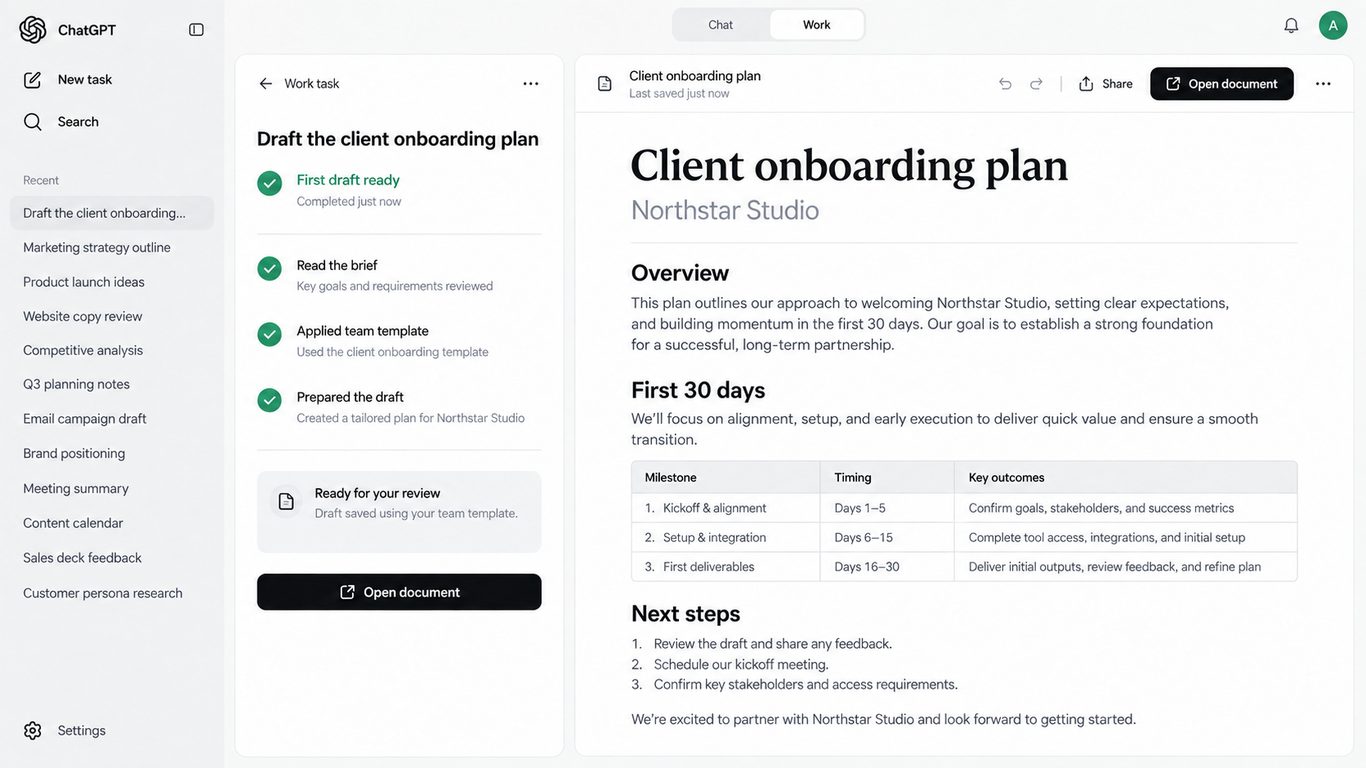
Astra’s value inside Work is not flashier paragraphs. It is first drafts that land closer to usable, and multi-step runs that hold a plan long enough to cross app boundaries without losing the plot.
Sites can be one output type among others. Useful for some teams. Not the whole story for most UK businesses.
How employee work changes
The job does not disappear. The shape of the job changes. People spend less time on swivel-chair choreography and more time on direction, judgement, and accountability.
Here are five everyday before/after sketches. They are illustrative, not customer case studies.
1. Coordinator / EA
Before: Three browser tabs for calendars, a travel site, a shared inbox. Manual notes. A summary email written from scratch after lunch.
After: Brief the agent: preferred dates, budget band, who must attend, what “good” looks like. Computer use checks availability, gathers travel options inside allowed sites, and drafts the summary email for human send. The coordinator still owns the invite and the tone. They stop being the glue between every system.
2. Sales / account manager
Before: Post-call CRM hygiene happens late or never. Meeting prep is a scramble across email, notes, and last quarter’s deck.
After: After the call, Work updates approved CRM fields and assembles a prep pack: account snapshot, open actions, suggested agenda. The salesperson reviews, corrects nuance, and goes into the meeting sharper. Pipeline quality improves because hygiene is no longer heroic overtime.
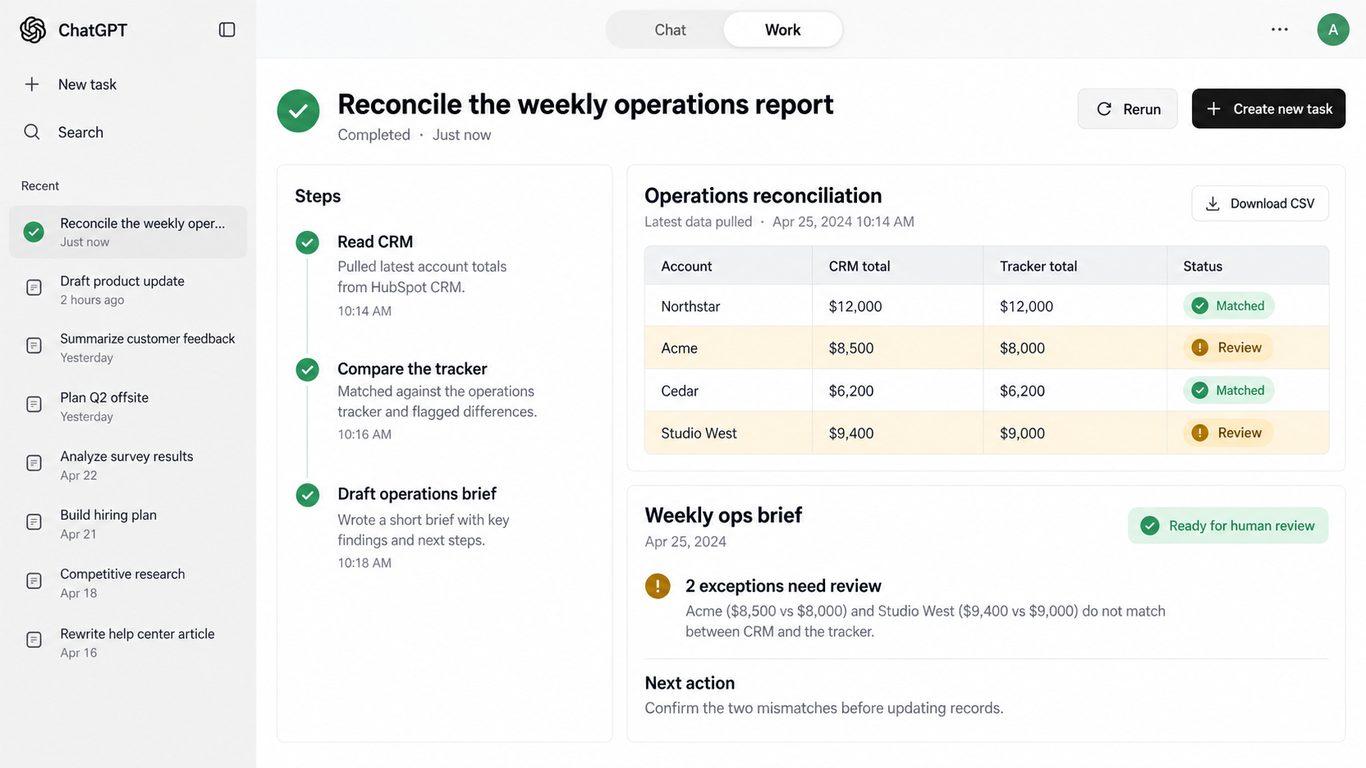
3. Ops / analyst
Before: Export from one tool, paste into Excel, rebuild the same weekly brief by hand. Numbers drift because the process relies on one person’s memory.
After: A recurring Work run pulls from allowed tools, refreshes a sheet, and drafts a short brief with exceptions highlighted. The analyst’s scarce skill shifts to questioning the outliers and deciding what the business should do next.
4. Marketing
Before: Research lives in bookmarks. The deck starts blank. Brand voice depends on who had time that week.
After: Research and competitive notes feed a deck built from your template. Astra’s strength at following structure helps first drafts look on-brand sooner. Marketing still owns claims, legal checks, and the story. They stop rebuilding the scaffolding every time.
5. Team lead
Before: The lead is the bottleneck: every awkward multi-app chore somehow lands on their desk.
After: The lead writes clearer briefs, sets review standards, and coaches the team on when to trust a run and when to stop it. Less doing. More directing. The new skill stack is goal clarity, good context, judgement on exceptions, and accountability for what goes out.
That last sentence is the real change management agenda. Tools arrive fast. Habits of ownership arrive slower.
If you train only on prompts, you will get flashy demos. If you train on goals, context, review standards, and when to stop a run, you will get quieter productivity that survives contact with customers and auditors.
What does not change
Computer use is powerful. It is not a substitute for a grown-up business.
- Someone still owns the outcome. If a wrong invoice goes out, “the AI did it” is not a governance model.
- Regulated or irreversible actions need a human. Send, delete, share, pay, approve, and anything with legal or customer impact should stay behind confirmation.
- Culture, negotiation, and trust stay human. An agent can prepare the pack. It cannot replace the relationship in the room.
- Physical work and true accountability stay with people. AI can reduce busywork. It cannot take responsibility in a board paper or a regulator conversation.
- Your existing security stack still matters. Microsoft 365 identity, Conditional Access, and the DLP rules you already run do not retire when Work arrives. Computer use should sit inside that estate, not beside it as a second, softer door.
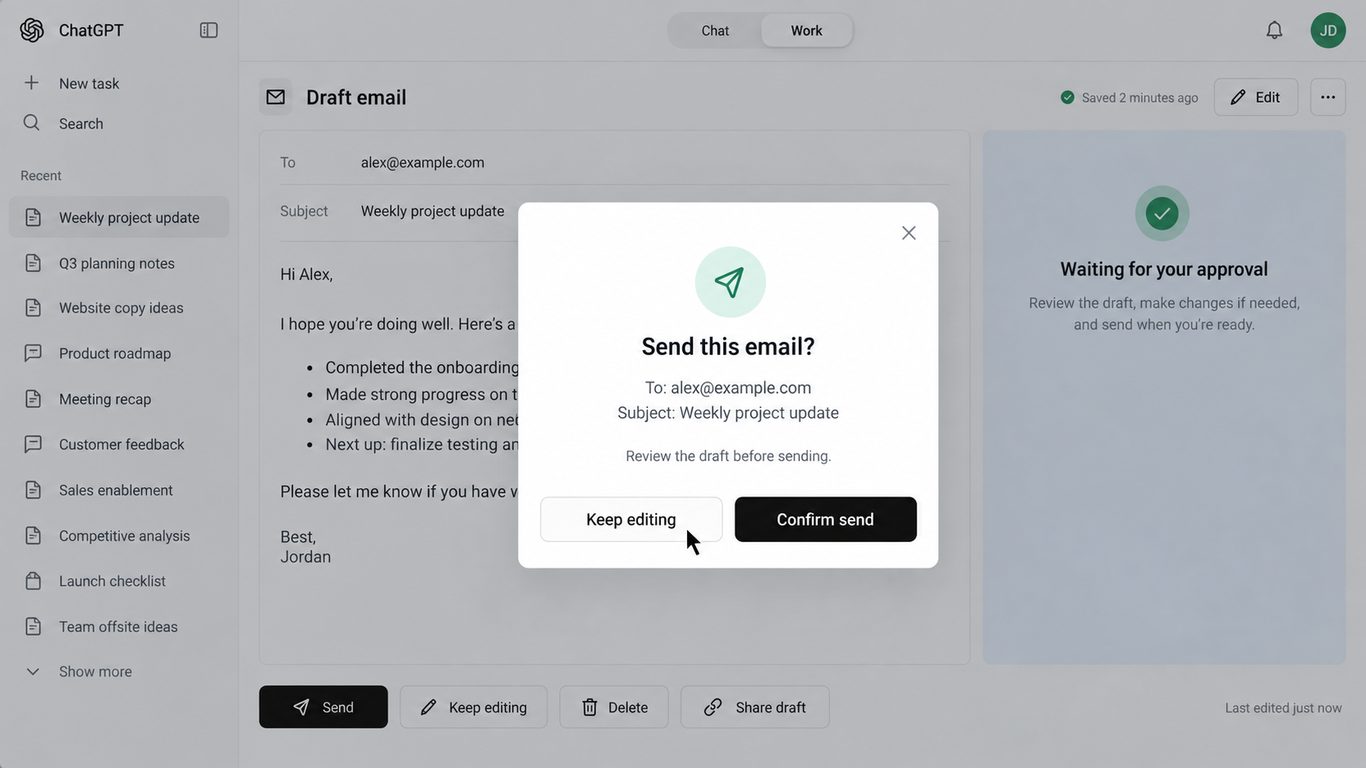
This is the trust section on purpose. UK MDs are right to be cautious. The answer is not fear. It is design: clear ownership, tight permissions, and boringly consistent review habits.
And when something almost goes wrong, treat it as useful data, not a secret. A near-miss is a brief that was unclear, an app that should not have been allowed, or a confirmation that was skipped. Log it, fix the rule, tell the cohort. That habit matters more than any single clever prompt.
Guardrails before you scale
OpenAI’s enterprise posture for Astra is sensible starting material. According to OpenAI, Astra can be off by default at launch for enterprise, with admin controls over access. You can restrict approved websites and desktop apps, manage uploads and downloads, set confirmation policies before consequential actions, and use Auto-review on risky tool calls.
Translate that into practical policy before the pilot grows legs:
- Who gets Work + Astra first? Pick roles with recurring multi-app chores and mature judgement, not everyone on day one. Provision through your normal Microsoft 365 identity path where you can, so leavers lose access the same day they lose email.
- Which apps and sites are allowed? Start narrow. CRM, calendar, browser research sites you trust, Office templates. Expand deliberately. Align the allow-list with the sensitivity labels and DLP policies you already trust for email and SharePoint, so computer use cannot quietly bypass rules staff already follow elsewhere.
- What never goes in? Payroll exports, unrestricted customer databases, secrets, anything your DPA or insurer would hate seeing in a prompt trail.
- What always needs confirm? External send, delete, share, payment, permission changes, anything customer-facing.
- What is the review checklist? Facts, recipients, attachments, tone, and “would I put my name on this?”
- Where do prompts and screen context live, and for how long? Decide residency and retention up front: which tenant, which region, what is retained from briefs and on-screen context, and who can see that history. Put it in writing before the pilot, not after the first awkward question from a customer or auditor.
- Who can replay a run after something goes wrong? Turn on (and actually use) audit logs. Name who can inspect a failed or risky run, how long logs are kept, and what “good enough” evidence looks like for a post-incident review. If you cannot reconstruct what the agent saw and did, you do not have a controllable system.
- What happens on a near-miss? Stop the run, preserve the log, tell the pilot owner the same day, tighten the allow-list or confirmation rule, and share the lesson with the cohort without blame. Near-misses are how you earn the right to expand.
One more practical point: shadow IT. If staff can install ChatGPT Work on a personal machine or with a consumer login outside your tenant, they will. Block or contain that early. Make the approved path easier than the unofficial one, or your carefully designed allow-list becomes theatre.
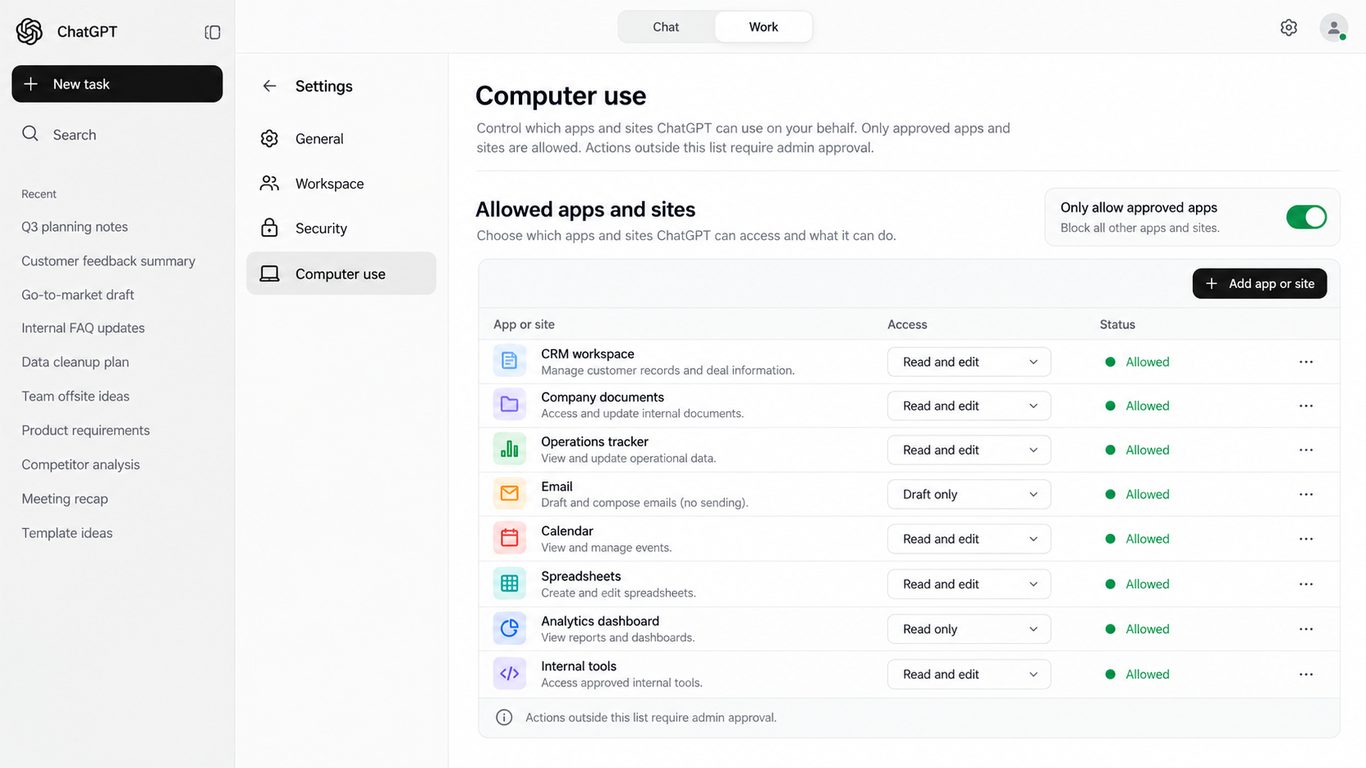
Computer Use as a desktop plugin only works inside the apps you permit. That is a feature. Use it.
A sensible 30-day pilot for a UK mid-market business
Skip the moonshot. Pick chores your team already hates and already understands.
- Choose three recurring multi-app tasks. Examples: weekly ops brief, post-meeting CRM tidy + follow-up draft, marketing deck from a fixed template.
- Enable for a small cohort. Five to ten people with tight app permissions and a named owner for the pilot.
- Require confirmation on send / delete / share / pay. No exceptions in month one.
- Measure the boring things. Time to first usable draft, rework rate, near-misses reported, how often people override or stop a run.
- Expand only what survives review. If a workflow saves time but creates quiet errors, fix the workflow or kill it. Do not scale vibes.
Keep a simple weekly log: what ran well, what needed rewrite, what nearly went wrong. Share it with the cohort without blame. The learning is the product of the pilot, not only the hours saved.
Thirty days is long enough to learn and short enough to reverse. That is the point.
Clarity, not panic
Computer use makes AI useful inside the apps your people already open. ChatGPT Work is where that becomes a daily habit rather than a party trick. GPT-6 Astra raises the ceiling on how far a single brief can go before a human needs to take the wheel.
None of that removes management. It raises the value of management: clearer goals, cleaner permissions, and teams who know when to trust a draft and when to rewrite it.
If you want a second pair of eyes on how this sits beside Microsoft 365, your SaaS estate, and the AI tools already creeping into the business, Aztech can help. We review the footprint, tighten the rules that matter, and design a pilot that fits how UK mid-market teams actually work: identity, permissions, approved apps, and a rollout plan your managers can explain without a slide deck full of hype.
No theatre. Just practical enablement with the guardrails left on.
Primary sources
- GPT-6 Astra (OpenAI)
- GPT-6 Astra: next-generation work (OpenAI)
- OpenAI business model page
- ChatGPT Work and Codex (OpenAI Help)
- Managing usage with GPT-6 Astra in Work and Codex (OpenAI Help)
- GPT-6 Astra model docs (OpenAI Developers)
Figures cited above are OpenAI’s published computer-use / safety comparisons versus GPT-5.6 Sol. Availability and plan details should be verified in your ChatGPT admin console and OpenAI Help at time of rollout.
-2.png?width=536&name=Blog%20Hero%20Banners%20(10)-2.png)
.png?width=536&name=Blog%20Hero%20Banners%20(7).png)