MFA Solutions for Milton Keynes Businesses

Two-factor and multi-factor authentication implementation, consulting and ongoing management, serving Milton Keynes, Buckinghamshire and the wider UK.

  • ISO 27001 Certified
  • Cyber Essentials Certified
  • Hands-On Implementation Support
  • Smooth User Adoption Process
4.9 Stars
hero banner half image desktop (4)

2FA & MFA Solutions for Milton Keynes Businesses

Expert consultants delivering practical two-factor and multi-factor authentication solutions across Milton Keynes and Buckinghamshire.
We design, implement and manage authentication systems that protect your business without frustrating your team. From initial assessment through deployment and ongoing support, we ensure smooth transitions with clear user guidance, system integration and measurable security improvements aligned to Cyber Essentials, NCSC guidance and industry best practice.

  • Simple 2FA for everyday protection

    Password plus one additional verification method (SMS code, authenticator app or email). Quick to deploy, easy for staff to use, blocks 99.2% of automated account compromise attacks.

  • Advanced MFA for sensitive systems

    Three or more verification methods for high-value data and privileged access. Combines passwords, biometrics, authenticator apps and device compliance to stop sophisticated threats.

  • Smooth implementation and user adoption

    Phased rollout with clear communication, training sessions and helpdesk support. We handle technical integration whilst your team learns new login routines without disruption.

  • Ongoing management and monitoring

    Regular reviews of authentication policies, user feedback and security logs. We adjust settings, troubleshoot issues and ensure your authentication remains effective as your business evolves.

  • Integration with existing systems

    Works with Microsoft 365, Google Workspace, VPNs, cloud applications and on-premise systems. We configure authentication across your entire technology estate for consistent protection.

  • Compliance and audit support

    Documentation, policy templates and audit trails for Cyber Essentials, GDPR, ISO 27001 and sector-specific requirements. Clear evidence that authentication controls meet regulatory standards.

hero banner half image desktop (11)

TL;DR — 2FA & MFA in Milton Keynes

Practical authentication solutions for Milton Keynes businesses. Our consultants design and implement two-factor (2FA) and multi-factor authentication (MFA) systems that protect your accounts, data and systems without overwhelming your team. From simple SMS codes to advanced biometric verification, we deliver smooth transitions with hands-on support, clear user guidance and ongoing management. Aligned to Cyber Essentials and NCSC best practice, with local Milton Keynes expertise since 2006.

What's the difference between 2FA and MFA?

2FA (two-factor authentication) requires exactly two verification methods — typically a password plus one additional factor like an SMS code or authenticator app. MFA (multi-factor authentication) requires two *or more* factors, often three or four for highly sensitive systems. Both are vastly more secure than passwords alone; we help you choose the right approach for each system based on risk and usability.

How long does implementation take?

Basic 2FA for Microsoft 365 or Google Workspace can be deployed within 1–2 weeks for most SMEs, including user communication and training. More complex MFA rollouts across multiple systems typically take 3–6 weeks depending on integration requirements and change windows. We work around your business schedule to minimise disruption.

Will staff find it too complicated?

Not with proper planning. We use phased rollouts, clear step-by-step guides, training sessions and helpdesk support to ensure smooth adoption. Most staff adapt within days once they understand *why* authentication matters and *how* it protects them. Authenticator apps are typically easier than SMS codes once users are familiar with them.

half image hero banners - desktop (13)

Why 2FA & MFA Matter for Milton Keynes Businesses

Passwords alone no longer protect your business. IBM's 2024 Cost of a Data Breach Report found the average UK breach now costs £3.58 million, with stolen credentials responsible for 22% of all incidents. Attackers use phishing emails, data breach databases and social engineering to harvest passwords daily — and once they have your credentials, they walk straight into your systems.


Two-factor and multi-factor authentication change the equation. Even if an attacker steals a password, they cannot access your accounts without the second (or third) verification factor. Microsoft's research across millions of accounts confirms that MFA blocks 99.2% of automated account compromise attacks — a dramatic, measurable improvement in security posture.


Yet only 48% of UK businesses use MFA across all applications and services, according to 2025 industry surveys. Many organisations still rely on passwords alone for email, cloud storage, financial systems and customer data — leaving themselves vulnerable to preventable breaches.


The good news: implementing 2FA or MFA is no longer complex or expensive. Modern authentication systems integrate seamlessly with Microsoft 365, Google Workspace, VPNs and cloud applications. With proper planning, clear communication and hands-on support, most businesses complete rollouts within weeks with minimal disruption.


That's where AZTech comes in. Since 2006, we've helped Milton Keynes businesses implement practical authentication solutions that protect accounts without frustrating staff. We assess your current systems, recommend appropriate authentication methods, handle technical integration and provide ongoing support to ensure your protection remains effective.

Real World Scenarios

Phishing-Email-Compromise

Phishing Email Compromise

Setup: An employee receives a convincing phishing email appearing to come from your IT team, asking them to "verify their account" by entering their password on a fake login page. They enter their credentials.
 
Without MFA: The attacker now has full access to the employee's email, can send emails as them, access customer data and potentially reset passwords for other systems.
 
With MFA: The attacker has the password but cannot generate the authenticator code or access the employee's phone. The account remains secure. The employee receives an unexpected MFA prompt, realises something is wrong and reports the incident. You reset their password and investigate — no data lost.
Data-Breach-Credential-Stuffing

Data Breach Credential Stuffing

Setup: A major online retailer suffers a data breach exposing millions of usernames and passwords. One of your employees used the same password for their work email. Attackers use automated tools to test these credentials against thousands of business email systems.


Without MFA: The attacker gains access to your employee's work email within hours of the breach becoming public. They monitor emails, identify customers and suppliers, and launch business email compromise attacks.

With MFA: The automated attack fails at the authentication stage. The attacker cannot generate the required second factor. Your systems remain secure even though the password was compromised elsewhere.
Insider-Threat-or-Disgruntled-Employee

Insider Threat or Disgruntled Employee

Setup: An employee with legitimate access to customer data decides to download records before leaving the company. They know their own password, obviously, and attempt to access systems from a personal device at home.


Without MFA: They log in successfully from their personal laptop, download sensitive data and leave the company. You discover the breach weeks later during an audit.

With MFA configured with device compliance: The login attempt from an unmanaged personal device triggers additional verification requirements. The system blocks access because the device doesn't meet your security policies. You receive an alert about the unusual access attempt and can investigate immediately.

FAQs

How much does 2FA or MFA implementation cost?
Implementation costs vary based on your systems, user count and complexity. Basic 2FA for Microsoft 365 or Google Workspace (up to 50 users) typically costs £1,500–£3,000 including assessment, configuration, training and initial support. More complex multi-system MFA rollouts range from £3,000–£8,000. We provide fixed-price quotes after initial assessment. Most businesses find the investment pays for itself many times over by preventing even a single breach.
Will MFA slow down our staff?
Modern authenticator apps add approximately 3–5 seconds to each login. Most systems remember trusted devices for 30–90 days, so users only authenticate fully when logging in from new devices or after the trust period expires. The minor time investment is vastly outweighed by the security benefit. We also configure "remember this device" options where appropriate to balance security with usability.
What happens if someone loses their phone with the authenticator app?
We configure backup authentication methods before rollout — backup codes stored securely, alternative devices registered or admin override procedures with identity verification. Most account recovery requests are resolved within 1–2 hours. The key is having documented recovery procedures that maintain security whilst enabling reasonable access restoration.
Can we implement MFA ourselves, or do we need a consultant?
Technically capable IT teams can implement basic 2FA for single systems (e.g., Microsoft 365) using vendor documentation. However, most businesses benefit from expert guidance for multi-system integration, conditional access policies, user adoption planning and ongoing management. We've implemented authentication for hundreds of organisations; we know the pitfalls, best practices and efficient approaches that save time and prevent mistakes.
Does MFA guarantee we won't be breached?
No security control provides 100% protection. Sophisticated attackers can bypass MFA through social engineering, malware or exploiting implementation weaknesses. However, MFA blocks 99.2% of automated attacks and dramatically raises the bar for targeted attacks. Combined with other security controls (email filtering, endpoint protection, security awareness training), MFA forms a critical layer in your defence-in-depth strategy.
How does MFA help with Cyber Essentials certification

Cyber Essentials requires appropriate access controls for accounts and systems. Whilst basic Cyber Essentials doesn't explicitly mandate MFA, implementing it demonstrates strong access control and significantly strengthens your security posture. Cyber Essentials Plus assessors increasingly expect to see MFA on administrator accounts and remote access. We help you implement authentication that meets certification requirements whilst providing genuine security benefit.

Can we phase MFA rollout, or does it need to be all at once?
Phased rollout is actually preferable for most organisations. Start with IT administrators and senior management, then expand to general staff in manageable groups. This approach allows you to refine processes, gather feedback and build internal expertise before wider deployment. We typically recommend 3–6 week phased rollouts for SMEs, though urgent security concerns can justify faster timelines.
What ongoing management does MFA require?

Regular reviews of authentication policies (quarterly), user account audits to remove leavers and adjust permissions, troubleshooting for lost devices or access issues, and monitoring for suspicious authentication attempts. Most SMEs spend 2–4 hours per month on authentication management once systems are established. We offer managed authentication services if you prefer to outsource this ongoing work.

Proudly serving Milton Keynes 2006

AZTech IT Solutions is your trusted local 2FA/MFA solutions provider in the Milton Keynes area. Implementing two-factor and multi-factor authentication solutions can be a challenge. Let our consultants help you with a smooth transition toward getting your password-protected accounts to a much greater level of security. Contact us today.

2FA and MFA solutions and consulting services

Recent massive data breaches like the ones that affected all three billion Yahoo accounts over several years have been a hot-button issue. But it's not just mega-corporations that have been compromised - in 2019 alone, there were over four billion reported data breaches.

Around a third of these are internal, instigated by an employee acting too carelessly with sensitive login information. To shore up their cybersecurity infrastructures, more and more businesses are turning to two-factor authentication (2FA) and multi-factor authentication (MFA).

2fa-mfa-solutions

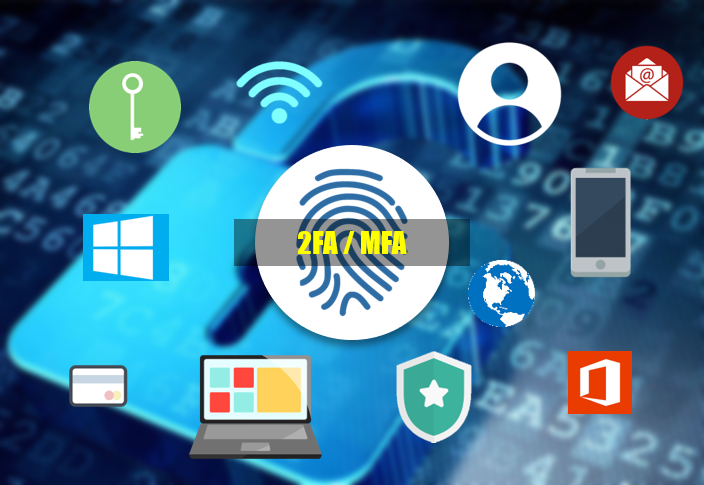
What are 2FA and MFA, exactly?

With a 2FA system, users are required to input two methods of identity verification (like a password and an SMS code) to access essential systems or information.

In an MFA system, users have to use more than two identifying verifications (like a password, thumbprint, SMS code and email code).

Is 2FA or MFA better for businesses?

Both 2FA and MFA have advantages and disadvantages.
Both are improvements over single-factor authentication (SFA) in almost every circumstance.
2FA is easier to use than MFA but is also less secure. On the other hand, MFA is hyper-secure but may frustrate users who have to juggle methods of authentication constantly or reenter multiple codes and passwords throughout the day.

Most businesses should use 2FA at a minimum, but MFA is highly recommended for sensitive information that may be a target for cybercriminals.

Meraki Support assistance

How can AZTech help you set up 2FA and MFA?

Setting up 2FA and MFA can be challenging. Businesses that choose to do so must also introduce various methods of authentication for every employee and make sure every employee can access systems using those methods smoothly.

AZTech’s consultants can help your business ensure a smooth transition during this process. To learn more about how you can use 2FA and MFA to improve your company's security, contact us today.

You’ve got a trusted and expert partner at your back

Digital Transformation Blog Image

Start with a FREE IT Assessment Today!

When you partner with us, you'll get the support you need so you can continue to work without the distractions. Contact us today!


Contact Us Today

Use the form to request a call back - we'll arrange a call as soon as possible.

Alternatively, contact us today on 0330 0949 420 or email info@aztechit.co.uk


Request A Call Back